Achieving Claude Code Freedom with Antigravity
If you are not familiar with CC or why you need it for vibe coding, please educate yourself. This article mainly shares practical tips for using the Google IDE tool (Antigravity) to solve problems such as insufficient daily quota, account bans, unfamiliarity with CLI operations, and high costs.
I. Claude Code Quota Description (Antigravity Platform)
Google AI Pro members can directly use Claude Code (Claude 4.5 Sonnet/Opus) on Antigravity. Although the official website does not publish precise token values, here are some references:
Relative Quota: Approximately 3 times the official Claude $20/month subscription, which is basically enough for daily programming use (bug fixes, refactoring, unit tests).
Model Limitations: In Antigravity, Claude Sonnet's context window is 1M (higher than some official restrictions).
 Account Type/Model Quota/Update Cycle
| Account Type | Claude Model Quota | Refresh Cycle | Remarks |
|---|---|---|---|
| Free Version | Undisclosed specific number | Refreshes weekly | Suitable for light use |
| Google AI Pro | Approximately 150 requests/5 hours, or 1200 requests/3 days | Refreshes every 5 hours | Officially called "more generous quota" |
| Google AI Ultra | Higher quota | Refreshes every 5 hours | $250/month, higher priority; required for newly released world models |
Important Restriction: If the 5-hour limit is triggered twice in a row, the system will activate the weekly limit (i.e., enter a "cooldown period" and need to wait longer to recover).
II. Update Cycle (January 2026 Edition)
Official Setting: Google AI Pro members enjoy a high refresh rate limit of once every 5 hours, which takes precedence over free users (weekly refresh).
Recent Adjustments: In early January 2026, some users reported that the cycle changed to 24 hours. In mid-to-late January, a new rule of 4-7 day weekly limit appeared. Even Pro members may trigger the weekly limit and need to wait 4-7 days to reset.
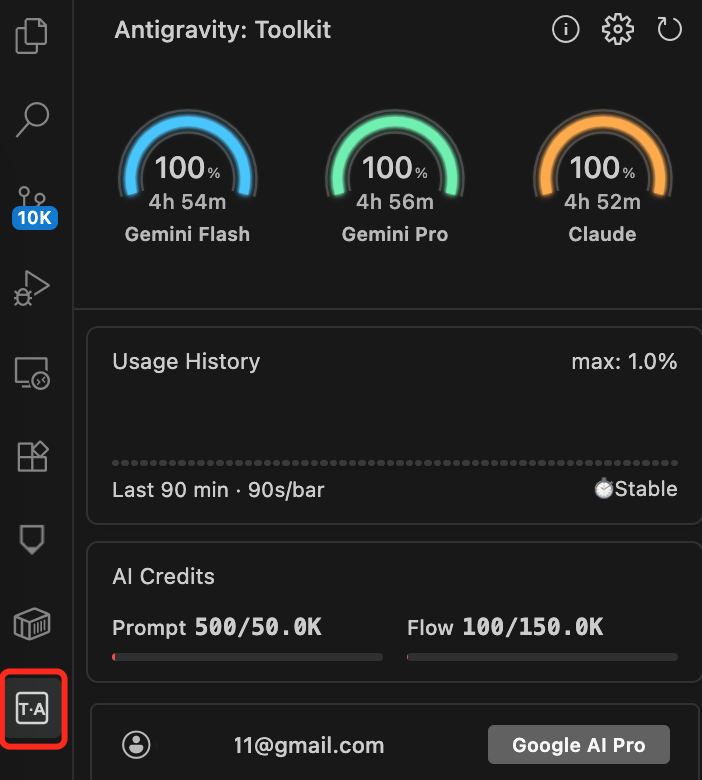
Display Method: You can view the remaining quota and reset countdown in real time on the Antigravity Tools panel.
The panel requires the installation of the third-party extension "Toolkit for Antigravity".
Installation and Opening Path:
- First open the Extensions panel
- Search for Toolkit for Antigravity and Install
- After installation, an Antigravity dedicated icon (usually the letter A or AG icon) will appear in the left activity bar
- Click the icon to open the panel
III. Solutions After Quota Exhaustion
[Recommended Official Channels]
Wait for Refresh: Under normal circumstances, wait 5 hours for the quota to reset automatically; if the weekly limit is triggered, you need to wait 4-7 days.
Switch Models: Antigravity automatically supports model switching. After the Claude quota is used up, you can temporarily use Gemini 3 Pro to continue working, which can generally meet daily R&D work.
Upgrade Subscription: Upgrade to Google AI Ultra subscription, the quota is almost unlimited, suitable for heavy programming use; it is also the threshold requirement for the latest Google world model (labs.google/ProjectGenie).
IV. Use Rationally, Reduce Consumption (For Reference)
First, align cognition: What you can control is not the quota number, but the consumption speed.
Programming tools such as Antigravity, repeated large-scale rewriting, long-chain reasoning, and full-warehouse scanning will significantly accelerate depletion. Therefore, the core strategy is to leave Claude for high-value links where Claude is stable, and leave the rest to more economical models/processes.
- Break down a large task into 3-5 small tasks (modify only one module each time)
- If not necessary, use the "Thinking/Highest Intensity" gear less often
- Let the Agent first produce a plan/difference list, and then execute (avoid repeated full rewriting)
Task Triage: Know which ones must use Claude and which ones can use Gemini3
Divide daily coding tasks into 5 categories (examples for reference, flexibly arrange according to actual situations)
1. Must be Handed over to Claude (High Value, High Risk)
- Complex architecture decisions / multi-file refactoring (especially involving boundary, abstraction, dependency organization)
- Tricky bug localization (multi-condition, race condition, asynchronous, boundary case)
- Security/permission/amount logic (finance/payment/order, risk control strong constraints)
- Understanding the intent of existing code (heavy historical burden, few comments, chaotic naming)
2. Gemini First (Save Quota and Enough)
- Write unit tests, supplement types, supplement comments, supplement documents
- UI/form/configuration files, boilerplate code
- Small-scale function implementation (clear input and output, few modified files)
- Log/embedding point/monitoring access
3. Hybrid (Gemini First, Claude Review)
Let Gemini make a draft/implementation first → then let Claude do Review, check for omissions and fill in gaps, and raise risk points, which can significantly reduce Claude usage
4. Any Model is Fine (Direct Automation)
Formatting, lint fixes, file renaming, generating changelog, these should be handed over to the tool chain (lint/formatter/script) as much as possible
5. Must-Have Tools/Retrieval
Check API, check SDK, check third-party library parameters, etc.; directly use documentation tools/search tools (MCP is better), avoid model self-creation
Three Practical Rules to Make Claude More Economical
- Prohibit full-warehouse scanning/reading the entire project becomes: Provide key files/key logs/key interface definitions
- Prohibit repeated overturning and redoing becomes: Only 1 scheme change is allowed per round; review before changing
- Prohibit lengthy explanations becomes: Root cause in one sentence + repair steps + patch + verification command
If you want to be more engineering-oriented, make it a model routing rule
- Requirements clarification/scheme review: Claude
- Code generation/testing/documentation: Gemini
- Complex bug + minimum diff: Claude
- lint/formatting/transport: Tool chain
- Third-party SDK parameters: Documentation tools/MCP
Finally, it is strongly recommended that you use the Google AI family bucket. Google AI Pro can be purchased through official channels, and there are some discounted ways to obtain it online. Heavy users should consider upgrading to Google AI Ultra subscription, and can also experience Google's latest world model first.