Claude-Code Desktop Client, Open Source and Free, Available for Windows
 I recommend an open-source desktop Agent client that directly packages the core capabilities of Claude Code into a beautiful GUI application - Craft Agents
Introduction
Craft Agents is an Agent desktop client open-sourced by the Craft team (the same Craft.do that's popular in the Apple ecosystem).
It is built on Anthropic's official Claude Agent SDK, essentially putting a sophisticated shell around Claude Code, while also adding many features that Claude Code doesn't have.
The following is the main interface of Craft Agents, with the conversation list on the left (like an email inbox) and the conversation area on the right:
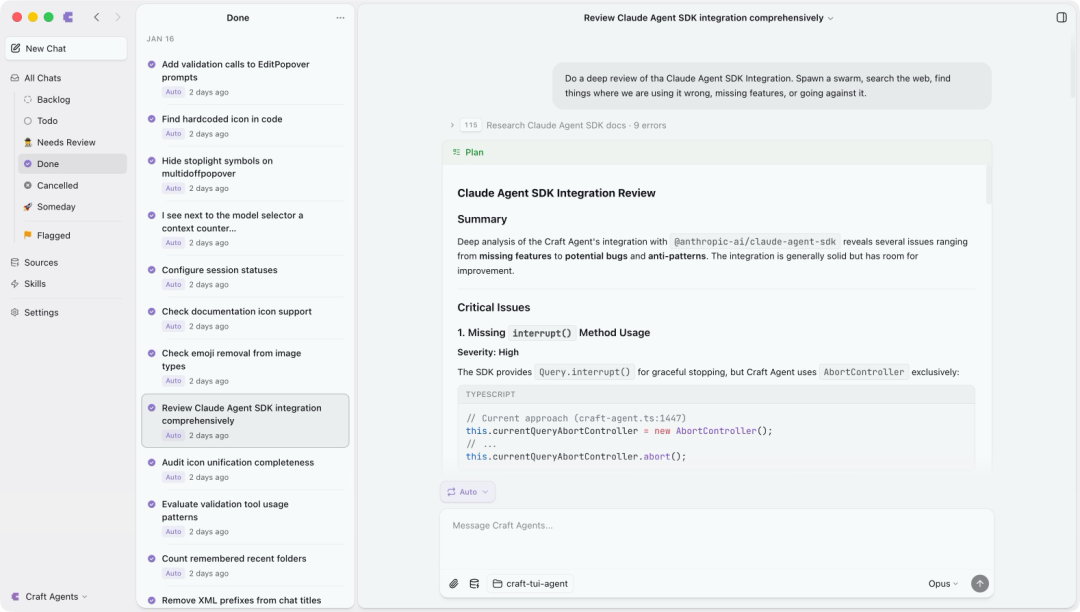 Craft Agents Main Interface
Core Features and Characteristics:
-
Multi-Session Inbox: Finally, no need to open a bunch of terminal windows! All tasks are managed in one place, supporting status marking (Todo → In Progress → Done), flags, and archiving.
-
Sources Data Source Connection: This is my favorite feature. You just tell the Agent "Add Slack as a data source", and it will automatically help you find the MCP server, read the documentation, and configure authentication, without ever touching a JSON file.
-
Three Permission Modes: Explore (read-only), Ask to Edit (ask you for every modification), Auto (fully automatic), switch with SHIFT+TAB, this design is so thoughtful.
-
Skills System: Similar to Claude Code's Skills, but easier to manage, can be called directly via @.
-
Complete Claude Code Experience: Streaming response, tool call visualization, real-time updates, everything you need is there.
Comparison with Claude Code:
Aspect
Claude Code
Craft Agents
Interface
Terminal CLI
Desktop GUI
Multitasking
Open multiple terminals
Inbox-style management
MCP Configuration
Manually edit JSON
Conversational configuration
Skills Management
Folders
@ Mention
Session Persistence
Need to save manually
Automatic saving
Open Source License
Proprietary
Apache 2.0
Installation
Installation is super simple, done with one line of command.
macOS / Linux:
curl -fsSL https://agents.craft.do/install-app.sh | bash
Windows (PowerShell):
irm https://agents.craft.do/install-app.ps1 | iex
You can also download the installation package directly from the official website:
-
macOS ARM64:
https://agents.craft.do/electron/latest/Craft-Agent-arm64.dmg -
macOS Intel:
https://agents.craft.do/electron/latest/Craft-Agent-x64.dmg -
Windows:
https://agents.craft.do/electron/latest/Craft-Agent-x64.exe -
Linux:
https://agents.craft.do/electron/latest/Craft-Agent-x64.AppImage
If you are a developer who likes to tinker with the source code:
git clone https://github.com/lukilabs/craft-agents-oss.git cd craft-agents-oss bun install bun run electron:start
Note that the project uses Bun as the runtime, not Node.js. The technology stack is very modern: Bun + Electron + React + shadcn/ui.
Usage
After starting, first select the API connection method:
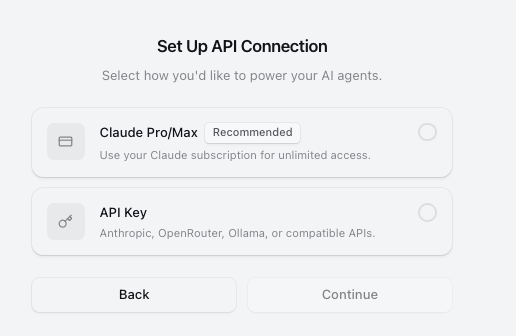
I chose the API Key method
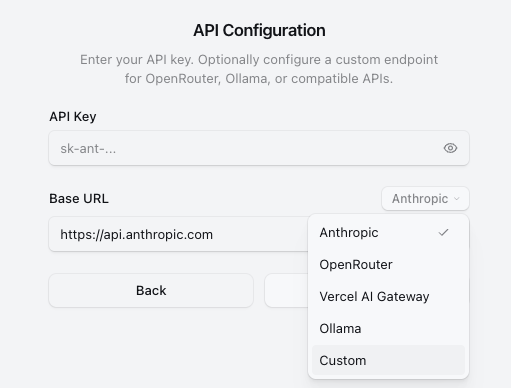
You can connect to Ollama, or customize it. Here I chose Custom
But it must support the Anthropic format API. Last time, I used the free Kimi-K2.5 from the generous Nvidia, but the API support for the OpenCode-applied K2.5 doesn't work.
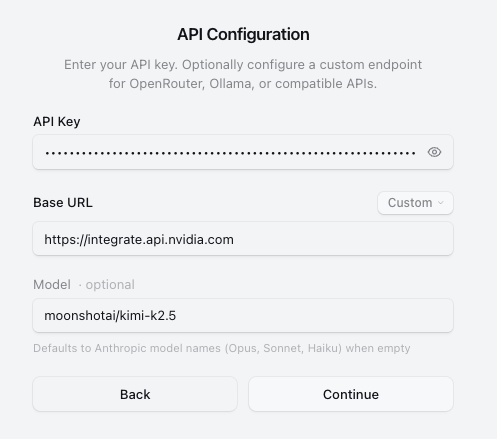
But siliconflow is okay, just remove /v1 and it works.
https://cloud.siliconflow.cn/i/YefhGWlT
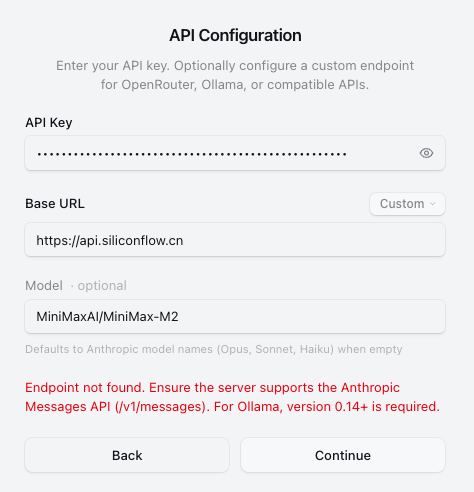
Then create a Workspace and you can start chatting.
Connecting to various services (this is the coolest part):
The Agent will automatically search for public MCP servers or API documentation and help you configure everything. You can even paste OpenAPI Spec or API documentation screenshots into it, and it can handle it itself.
The official said they even connected it to a Postgres database behind a jump server, showing the power of the Skills + Sources combination.
Already have a Claude Code configuration?
If you have configured a bunch of Skills and MCP in Claude Code before, just tell the Agent "Import all Skills from Claude Code", and it will help you migrate them.
Permission Mode Switching:
I usually use the ask mode (Ask to Edit), which asks me every time I write a file or execute a command. After confirming that the process is smooth, switch to allow-all to let it run automatically.
You can use the SHIFT+TAB shortcut to cycle between the three modes.
Real-World Testing
I connected it to several data sources that I use daily: GitHub, a local Obsidian note library, and a self-built MCP server.
Advantages:
-
The UI is indeed beautiful, more comfortable than looking at the terminal, and less tiring for long-term work.
-
Multi-session management is really convenient, finally able to handle Agent tasks like handling emails.
-
Data source configuration is so smooth, configuring an MCP used to take half a day to flip through documentation and modify JSON, now it's done in one sentence.
-
Sessions are automatically saved, they are still there when you close and reopen, Claude Code can't do this.
-
Friendly open-source license, Apache 2.0, no pressure to modify.
Summary
If you are a heavy user of Claude Code and want a more friendly GUI interface, Craft Agents is definitely worth a try.
If you are an Agent developer and want an open-source desktop Agent framework as a reference, this Electron + React + Claude Agent SDK architecture is also worth learning.
Suitable for:
-
Developers who find the terminal not friendly enough when using Claude Code
-
People who need to manage multiple Agent tasks simultaneously
-
People who want to connect various services (GitHub, Slack, Google Suite) to Agent workflows
-
Teams that want an open-source Agent desktop application as a basis for secondary development
Finally, the Craft team mentioned that they "use Craft Agents to develop Craft Agents" - without using a code editor at all, any customization only requires one sentence.
This concept is quite interesting, maybe this is the future form of Agent Native software.
Official website: https://agents.craft.do/
GitHub: https://github.com/lukilabs/craft-agents-oss
Demo video: https://www.youtube.com/watch?v=xQouiAIilvU
#CraftAgents #ClaudeCode #Agent #MCP #OpenSource



