Claude Code Installation LSP: Finally Letting AI 'Understand' Code
Claude Code Installation LSP: Finally Letting AI 'Understand' Code
 As a long-time user of Claude Code, I have always had a personal experience: it is very smart, but also very blind. Smart in that it can generate well-structured code; blind in that it does not know what your code really looks like.
And LSP — Language Server Protocol — is the key step to giving it 'eyes'.
What is LSP? Explained in One Sentence
LSP, short for Language Server Protocol. To put it more simply:
It is a 'unified interface' that enables editors and AI to have code understanding capabilities.
The features you are used to in VS Code:
- Ctrl click on function names to jump to definitions
- Hover over variables to view types
- Find references
Without LSP, Claude Code can only rely on 'Grep global string matching' for any search; with LSP, Claude Code can directly ask the language server for answers — accurate, fast, and low token consumption.
Why Should You Care About LSP?
In the past year, the most painful experience of coding with Claude Code has been:
Token consumption is excessive.
When it helps modify a function, it will:
- Grep the entire project
- Then Grep references
- Then Grep definitions
- Then Grep the call chain
The Milvus team's actual test data illustrates the problem well:
Token consumption can be reduced by over 40% after enabling LSP.
For large projects and teams that frequently refactor, this is a direct cost optimization.
What Can LSP Do? 7 Core Capabilities That Claude Code Relies On
Starting from version 2.0.74, Claude Code officially enables LSP and will automatically call the following capabilities in the background:
- goToDefinition: Jump to definition
- findReferences: Find references
- hover: Hover to view types and documentation
- documentSymbol: List functions/classes/variables in the current document
- workspaceSymbol: Project-wide symbol search
- goToImplementation: Jump to interface implementation
- incomingCalls / outgoingCalls: Call chain analysis
More importantly:
You do not need to trigger them manually. Claude Code will automatically prioritize using LSP instead of Grep.
Three Ways to Use LSP (Ranked by Recommendation)
Method 1: VS Code Integration (Easiest and Most Stable)
If you are already using VS Code, it is almost zero cost:
- Start Claude Code in the VS Code terminal
- Type /config
- Set:
- Diff tool = auto Auto-install IDE extension = true
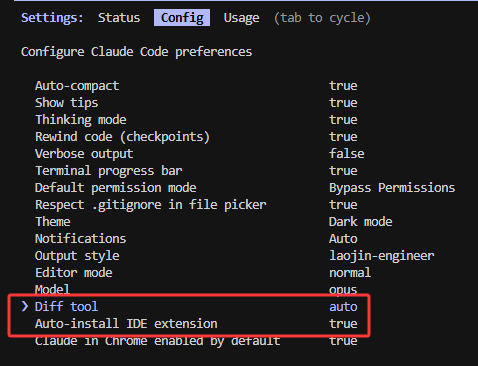 Claude Code will automatically detect VS Code and install the extension for communicating with LSP.
Suitable for: The vast majority of developers.
Method 2: cclsp (Community MCP Solution)
If you do not use VS Code or encounter various errors with the official LSP, you can use this:
npx cclsp@latest setupThe biggest advantage of cclsp is:
- Automatically corrects line and column numbers
- Suitable for multiple languages
- Actively maintained by the community
Method 3: Manual Configuration of .lsp.json (For Tinkering Enthusiasts)
Create a .lsp.json file in the project root directory:
{ "typescript": { "command": "typescript-language-server", "args": ["--stdio"], "extensionToLanguage": { ".ts": "typescript", ".tsx": "typescriptreact" } }, "python": { "command": "pylsp" } }The language server needs to be installed separately, for example:
npm install -g typescript-language-server pip install python-lsp-server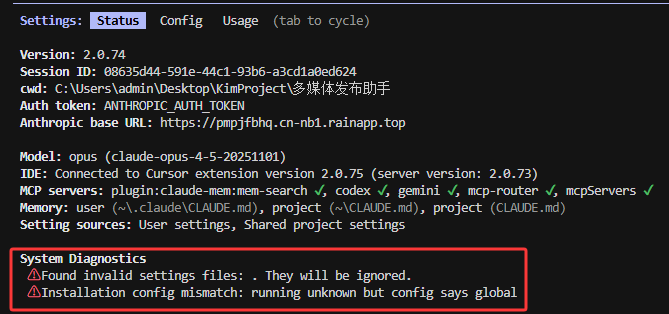 Suitable for: Engineers who highly customize their environment and have perfectionist tendencies.
How to Determine if LSP is Really Working?
Currently, Anthropic does not provide a clear UI status indicator, but you can determine it this way:
- Ask Claude Code to jump to definition: "Where is function X defined?" Returns precise file + line number = normal; returns a bunch of Grep results = unsuccessful
- Use cclsp test commands
- Observe token consumption: Dropping from tens of thousands of tokens to one or two thousand is the most obvious difference.
Who Really Needs to Configure LSP?
Recommended configuration situations:
- Projects exceeding 10,000 lines
- Frequent refactoring
- Sensitive to token costs
- Want Claude Code to have IDE-level code understanding capabilities
- Small projects, searches are fast
- Mainly writing new code, not reading old code
- Waiting for a more stable official version
Main Issues Encountered During Current Use (As of December 2025)
- No LSP server available: Usually means the language server is not installed correctly.
- No status visualization: Cannot see in the UI whether LSP is connected.
- Call chain and other operations occasionally fail: Incomplete cross-file references.
In Conclusion: LSP is the 'Vision Upgrade Package' for Claude Code
In the past, AI writing code was more like 'exploratory understanding', essentially relying on search and pattern matching. With LSP, it finally truly possesses:
Understanding project structure → Accurate positioning → Low-cost code handling
If the language you are using is TypeScript or Python, I strongly recommend trying the VS Code integrated version first. This is an important step in making Claude Code a truly 'usable development assistant'.
If you encounter problems, the GitHub discussion area and community solutions are very active and can quickly resolve issues.



