find-skills Getting Started Guide: The Intelligent Finder of Agent Skills
2/13/2026
8 min read
find-skills Getting Started Guide: The Intelligent Finder of Agent Skills
With the popularity of Agent Skills, there are countless skills on the market. How to find the right skills from so many skills and download and use them with one click?

For people who use AI tools, is there a similar convenient experience? The answer is yes - find-skills is such an existence.
What is find-skills
Before delving into find-skills, we must first understand a concept: what exactly are AI skills.
Simply put, skills are like "functional plugins" installed for AI assistants. For example, when you use AI to write code, you need it to help you check the quality of React code. This can be achieved through a dedicated skill. Or, you want AI to automatically generate project update logs, which can also be a skill.
So what is find-skills? Its positioning is very clear - a tool to help you quickly discover, install, and manage these skills. It does not create skills itself, but plays the role of a "search engine", finding the one you really need from thousands of existing skills.
Imagine this: your AI assistant is like a smartphone, and skills are like various APPs on the phone. Without find-skills, you need to search everywhere in the ocean of the Internet, browse GitHub repositories, read technical documentation, and compare different solutions... This process may take a lot of time. But with find-skills, the situation is completely different. It's like opening an app store, saying what you need, and the relevant skills will appear immediately and be installed with one click.
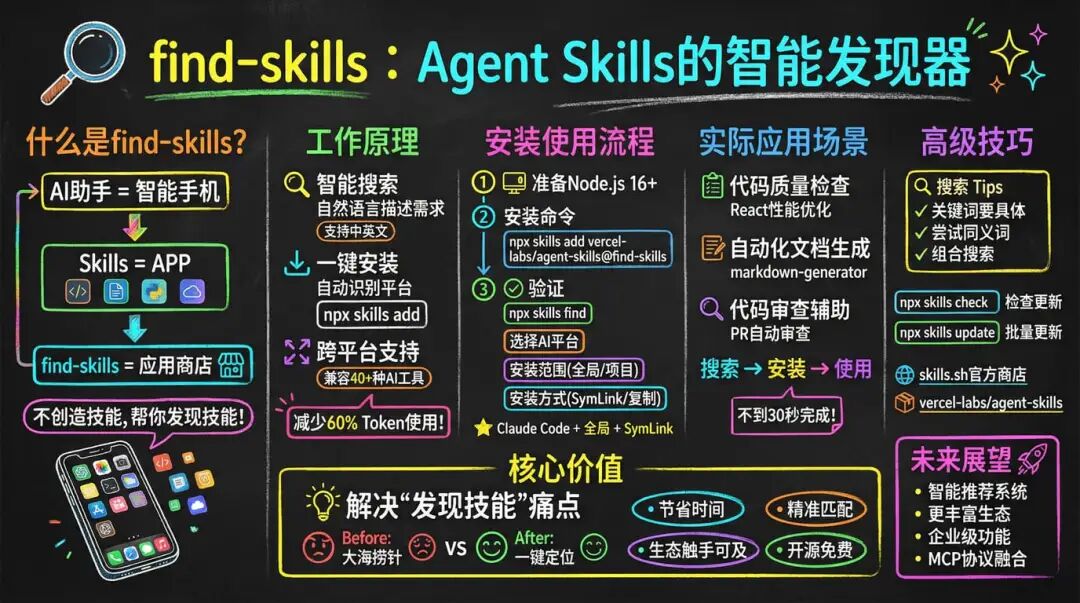
How find-skills Works
The core functions of find-skills can be summarized in three aspects:

First is intelligent search. You only need to describe your needs in natural language, and find-skills can understand your intentions and match relevant skill packages from the skill library. It supports both Chinese and English searches, and there is a trick - the more specific the search term, the more accurate the results.

The second is one-click installation. After finding the right skill, you don't need to manually download files, configure environment variables, modify configuration files... You can complete the entire installation process with just one command. Whether you are using Claude Code, Cursor, or other AI tools, find-skills can automatically identify and install it in the correct location.

Finally, cross-platform support is a major highlight of find-skills. It is compatible with more than 40 AI agent tools, including Claude Code, GitHub Copilot, VSCode plugins, etc. What does this mean? The skills you learn to use on one platform can also be used on other platforms, and will not be restricted by changing tools.

From a technical perspective, find-skills adopts a dynamic loading mechanism. A skill is only loaded into memory when it is triggered. This on-demand loading design significantly reduces resource consumption. Data shows that this mechanism can reduce context Token usage by more than 60% while improving execution efficiency. This is especially important for resource-sensitive development environments.
How to Install and Use find-skills
The process of installing and using find-skills is actually very simple, just a few steps:

Step 1: Prepare the environment

Make sure Node.js is installed on your computer, version 16 or higher. If you haven't installed it yet, you can go to nodejs.org to download the latest LTS version. The good news is that most developers' environments already meet this requirement.

Step 2: Install the tool

Open a terminal or command line and enter:

`npx skills add vercel-labs/agent-skills@find-skills`
After running this command, the system will guide you through several configurations:


    - Select the AI platform to install (supports 40 Agents, you can install them all at once, or you can choose only the commonly used ones)
    - Choose the installation scope: global installation (available for all projects) or project-level installation (only available for the current project).

    - Choose the installation method: symbolic link (recommended, more convenient for future updates) or directly copy the files.

If you often use Claude Code, my suggestion is to choose Claude Code + global scope + SymLink, so that all projects can use it, and future updates will be more convenient.

Step 3: Verify Installation

After the installation is complete, enter:

`npx skills find`
If you see the search interface, congratulations, the installation is successful! Next, you can start using find-skills.
Practical Application Scenarios
After mastering the basic usage, let's see what find-skills can help us do in actual work.

Scenario 1: Code Quality Inspection

Suppose your project is a React application, and you want AI to help you check for potential performance issues and violations of best practices in the code.

In the AI tool, you only need to say: Help me find a skill related to React performance optimization.

find-skills will immediately execute the search and then list the relevant skills:


    - vercel-react-best-practices: Contains more than 40 automated rules, covering Hooks dependency checks, SSR hydration error prevention, etc.

    - react-optimization-guide: Provides detailed optimization suggestions and code examples.


Select the skill you need, say install the first one, and AI will automatically complete the installation for you. The whole process takes less than 30 seconds, just like downloading an APP in an app store, simple and fast.

Scenario 2: Automated Document Generation

Your team needs to regularly update project documentation, but manually writing documentation is time-consuming and prone to omissions.

You can say: Find a skill to automatically generate documentation.

find-skills will find:


    - markdown-generator: Automatically generates Markdown documents based on code comments.

    - api-doc-generator: Automatically generates API interface documents.


After the installation is complete, you only need to tell AI to help me generate project documentation, and it will automatically call these skills, scan your code repository, and generate complete documentation. The time saved can be used to do more valuable things.

Scenario 3: Code Review Assistance

The team has to review multiple Pull Requests every day. Manual inspection is not only inefficient but also prone to missing problems.

Say: PR review automation

find-skills will return:


    - pr-review-automation: Automatically checks for code quality issues, potential bugs, and best practice violations.

    - code-quality-checker: Provides code quality scores and improvement suggestions.


After installing these skills, AI will automatically run checks and provide detailed review comments every time a PR is created. In actual use, this can significantly reduce the workload of manual review and allow the team to focus on more valuable code discussions.
Advanced Tips and Best Practices
After using it for a while, I found some tips to share with you:

Search Tips


    - Keywords should be specific: If you want to find skills related to React testing, searching for react testing will be more accurate than simply searching for testing.

    - Try synonyms: If deploy cannot be found, try deployment or ci-cd.

    - Combined search: Use multiple keywords to narrow the scope, such as typescript async instead of searching for typescript alone.


Skill Management


    - Check for updates regularly: `npx skills check` to see which skills have new versions.

    - Batch update: `npx skills update` to update all skills with one click.
    - Clean up useless skills: If a skill hasn't been used for a month, consider deleting it.


Finding Unlisted Skills

Sometimes you may not find a skill that perfectly meets your needs. Don't worry, try these methods:


    - Visit skills.sh, the official skill store.

    - Browse the Vercel official repository vercel-labs/agent-skills

    - Consider creating one yourself: The SKILL.md format is very simple.

    - Seek help from the community: There are many enthusiastic developers on GitHub, Discord, Reddit, etc.
Limitations of find-skills
Like any tool, find-skills has its limitations:


    - It can only find open-source skills; commercial or private skills are not within the search scope.

    - Search results may not perfectly match your needs.

    - The quality of skills varies, and you need to evaluate them yourself.


But even if the skills found are not perfect, they are often much faster than writing them from scratch.
Future Outlook
The success of find-skills has shown me that the AI skill ecosystem is maturing. The following development directions are possible in the future:


    - More intelligent recommendation systems

    - Richer ecosystem

    - Enterprise-level features: permission management, audit logs, etc.

    - Integration with other protocols: Deep integration with protocols such as MCP.
Summary
After using find-skills for so long, my feeling is that although it has simple functions, it has great value. What is the core value? It solves the pain point of discovering skills. In today's rapidly developing AI agent tools, new skills are emerging one after another. Without tools like find-skills, finding skills is like looking for a needle in a haystack. With it, one command can accurately locate, saving a lot of time and energy.
If you frequently use AI tools for programming, or if you want to quickly add new features to AI, find-skills is worth ten minutes of installation and trying.
Published in Technology



