It's Finally Here! Ralph TUI, Visualized Ralph Loop
It's Finally Here! Ralph TUI, Visualized Ralph Loop
I wrote a tutorial about ralph-loop before, and many friends who followed it gave consistent feedback: It's great, Claude Code can finally run for a long time. But sometimes you observe it and it seems to be motionless, and you can't help but wonder: "Is it actually progressing, or is it just spinning in circles?"
That's why I've been working on ralph-tui recently.
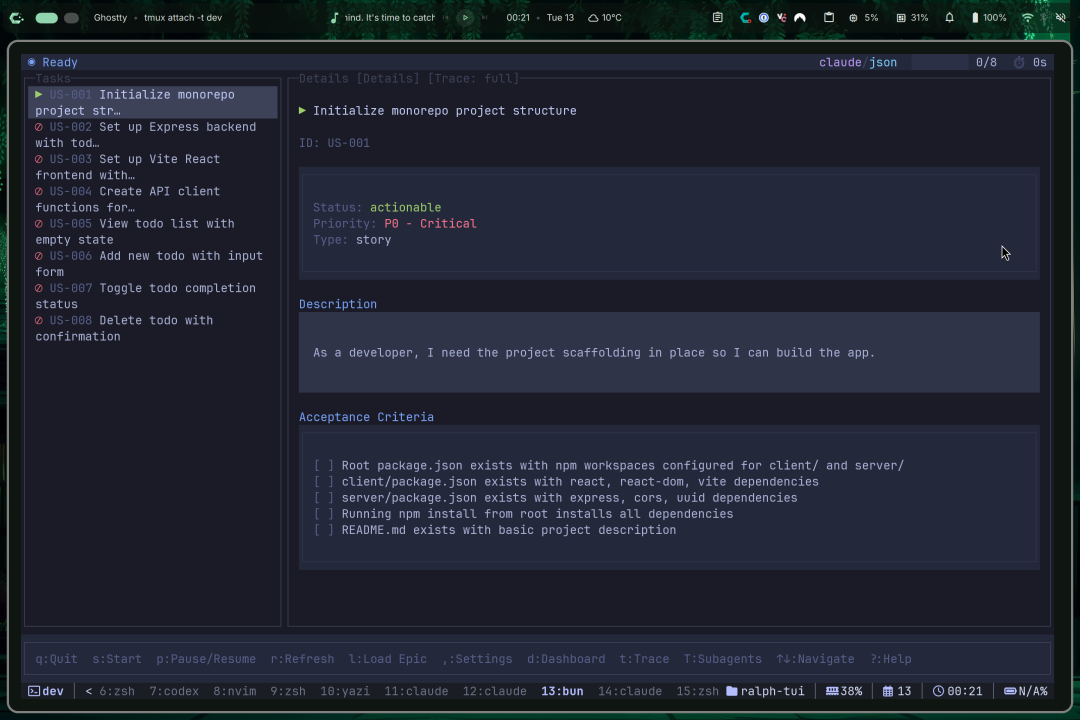
ralph-tui doesn't force you to use Claude Code. It inherits and develops the essence of ralph loop, and visualizes task execution and processes, greatly reducing the barrier to entry for large models to work for long periods of time. You can completely connect other agents, other models, domestic ones, cheap ones, the kind you can afford to run for a long time. With ralph-tui, for ordinary people like us, the significance is no less than switching from a manual transmission to an automatic transmission with cruise control.
What exactly is it?
You can think of ralph-tui as a "loop orchestrator for AI coding agents", but it's not just about "being able to run", it's more about "you can see it, control it, and recover it".
Its basic way of working is very simple:
- You give it a bunch of tasks (from PRD or other task systems)
- It picks the one with the highest priority
- Assembles the prompt
- Launches the agent to execute it
- Determines whether the task is considered complete
- Writes the status
- Continues to the next round
The key is: you can see all of this in the terminal, and you can stop and take over at any time. The official positioning is also very straightforward: an agent loop orchestrator with an interactive TUI, and supports TUI / headless / remote.
Why do I say it's more suitable for "long-term running"?
The biggest problem with running a loop script is not that it can't run, but that you don't know where it's running.
You see the logs flashing quickly, and the fan is spinning happily, but you're not sure:
- Is it repeatedly fixing the same bug?
- Is it constantly changing the same piece of code and then changing it back?
- Is it already finished, but just hasn't exited?
- Is it stuck in a dead loop on some test?

ralph-tui's solution is very "engineering-oriented":
- It has the concept of a session, and the status is saved to disk (.ralph-tui/session.json)
- It can be recovered and run after a crash (crash recovery)
- It has a lock mechanism to prevent you from opening multiple instances and messing up the directory
- It can also be run headless in CI, and even remotely open a listener and connect to it with a local TUI
In a word: It's more like "you're managing a worker who can write code" rather than "you're staring at a script going crazy".
How to install
ralph-tui is a Bun/TypeScript ecosystem, so it's quite easy to install. The official website also provides an installation page.
First, make sure you have bun on your machine:
bun --version
Then install ralph-tui (I'll give a typical installation method here, the specific method is subject to the official installation page):
bun add -g ralph-tui
After installation, confirm:
ralph-tui --help
If you are a Node user and don't want to touch bun, that's fine too:
npm i -g ralph-tui
Don't do anything big yet, run a minimal closed loop
I suggest that the first time you use it, don't do anything like "refactoring the entire repo". Just do one thing: Make it run through a small, acceptable task.
Initialization
Open a directory at will:
mkdir ralph-tui-demo && cd ralph-tui-demo ralph-tui setup
This will enter an interactive wizard process, which basically means "installing ralph-tui into your repository". It will:
- Automatically detects which agents are installed on your machine (such as Claude Code, OpenCode, etc.)
- Generates a configuration file in the project: .ralph-tui/config.toml
- Conveniently installs PRD generation/task conversion related skills (so you don't have to manually configure them later)
My personal suggestion: Don't be lazy the first time, make sure to run setup once.
Generate Project PRD
After running setup, the next step is the most core part of the official tutorial, and also the most suitable part to write as a public account demo: create-prd.
The ralph-tui create-prd --chat command will enter a conversational process, where it will ask you about your requirements, goals, boundary conditions, and acceptance criteria like a product manager. After asking, it will directly output two things in the project (this is the key point):
- A PRD markdown file: ./tasks/prd-feature.md
- An executable task file: ./prd.json
At this point, you have truly entered the "standard closed loop" of ralph-tui:
Requirement (PRD) → Task (prd.json) → Execution (run)
Run it
With prd.json, running it becomes natural:
ralph-tui run --prd ./prd.json You will see the TUI start up and begin looping: picking a task → executing → judging completion → writing status → ending or next round.
For the first run, I strongly suggest adding an iteration limit to keep it contained:
ralph-tui run --prd ./prd.json --iterations 5 After running, check the changes, run tests, and see if the PRD and tasks meet expectations. Confirm that this link is working, then release the iterations and go headless/remote, which is a reliable rhythm.
At this point, you can basically confirm: This loop is really running.
How to Choose Models/Agents? Let's Be Honest About Saving Money
I know many people are most concerned about: "Can I not use Claude Code? Can I use cheaper models?"
The answer is: Yes.
ralph-tui itself supports you specifying the agent and model (there are examples in the official run documentation).
For example, using Claude Opus:
ralph-tui run --prd ./prd.json --agent claude --model opus But honestly, I wouldn't use Opus to do things like "add tests, fix lint", it's too expensive. My habit is to stratify:
- Cheap models: Run a lot of repetitive labor (add tests, add comments, fix formatting, add boundaries)
- Expensive models: Only appear at key nodes (architecture adjustments, difficult bugs, core logic)
If you are an ordinary developer, this idea is even more important. Because you don't have a large factory budget, you have to make the cost controllable to run for a long time.
Want to Be More Comfortable? Give the "Write PRD" Task to the Agent
ralph-tui has a design that I quite like: it supports skills (basically a set of agent plug-in commands).
The official installation method is to use add-skill:
bunx add-skill subsy/ralph-tui --all Or install it to a specified agent, such as claude-code:
bunx add-skill subsy/ralph-tui -a claude-code -g -y After installation, you can use slash commands in the agent session:
/ralph-tui-prd /ralph-tui-create-json /ralph-tui-create-beads This is very similar to installing a plugin in your IDE, except that this plugin is for the agent. Its significance is to reduce the time of "manually moving requirements" and make the requirement → task → execution more like an assembly line.
When Should You Use It? When Should You Not?I don't really like the narrative of "AI can handle everything," as it's easy to mislead people. A tool is just a tool, and it's only valuable when it fits the scenario.
Suitable Scenarios for ralph-tui
You have a bunch of tasks like these:
- Supplementing tests (especially for old projects)
- Fixing lint / format
- Small-step refactoring (converging duplicate code)
- Adding types in batches, supplementing boundaries
- Decomposing requirements and pushing them slowly according to the task queue
These types of tasks have something in common: Many tasks, high degree of repetition, can be accepted, and can be iteratively promoted.
Scenarios Where It's Not Suitable to Force ralph-tui
You are doing something like this:
- One-time large refactoring, unclear acceptance criteria
- The requirements themselves are vague, relying on your implicit knowledge
- Requires a lot of cross-team communication/confirmation
- Requires you to make product judgments
For this kind of task, the agent loop will only amplify the chaos.
What's the difference between it and ralph-loop (ralph-claude-code)?
ralph-claude-code is more like an "autopilot plugin for Claude Code": the script pulls it up, runs the loop, and covers the bottom line for exit detection, rate limiting, and circuit breakers. You want "fast", and it's very fast.
ralph-tui is more like an "engineering console for the agent loop": it doesn't hardcode a certain model, nor does it hardcode a certain task system. It wants to solve engineering problems such as "long-term running, observability, controllability, recoverability, and remote access".
So you ask me how to choose?
- You are a Claude Code user and want to get it running quickly → ralph-claude-code
- You want to connect different models, save money, and manage the loop as a service → ralph-tui
Finally: Don't Let It Treat Your Repository as a Laboratory
I have a few iron rules for running the agent loop myself. If you write them down and follow them, the probability of a crash will be much smaller:
- Run it on a branch, don't play around on main.
- Be sure to add --iterations the first time you run it, and confirm in small steps that it won't go crazy.
- The task must be acceptable: either it can run tests, or it can run lint, or it can compare output files.
- You have to learn to stop: seeing it start to go in circles, pausing is smarter than continuing to burn money.
- Cheap models do rough work, expensive models do critical work: cost is operated, not prayed for.Project address: https://github.com/subsy/ralph-tui



