OpenClaw + Claude Code Powerful Tutorial: Build a Complete Development Team by Yourself!
OpenClaw + Claude Code Powerful Tutorial: Build a Complete Development Team by Yourself!
Today, I am sharing an explosive practical case. (Tutorial attached at the end)
An independent developer built an AI Agent system using OpenClaw + Codex/CC. What results did he achieve?
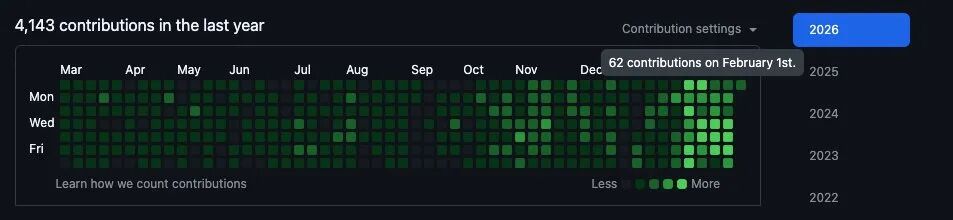
94 submissions in one day, 7 PRs completed in 30 minutes, and on that day, he also held 3 client meetings without even opening the editor.
This really happened in January 2026. The author has made the entire system architecture, workflow, and code configuration public. After reading it, I felt this approach is worth learning, so I organized it into this article to share with you.
If you are also using Codex or Claude Code, or are interested in OpenClaw, this article will provide you with a lot of inspiration.
One Person, 94 Code Submissions in One Day
First, let’s look at some data to feel the power of this system:
- Maximum of 94 submissions in a single day (average of 50 submissions per day)
- 7 PRs completed in 30 minutes
- The speed from idea to launch is so fast that it can "deliver customer requirements on the same day"
What about the cost? $190 per month (Claude $100 + Codex $90), beginners can start for just $20.
You might ask: Did he just pile up a bunch of AI tools and generate garbage code like crazy?
No. The author's Git history looks like "just hired a development team," but in reality, it’s just him. The key change is: he shifted from "managing Claude Code" to "managing an AI butler, which then manages a group of Claude Codes."
- Before January: Directly writing code with Codex or Claude Code
- After January: Using OpenClaw as the orchestration layer to schedule Codex/Claude Code/Gemini
Why Is Using Codex and Claude Code Alone Not Enough?
At this point, you might think: Codex and Claude Code are already powerful, why add an orchestration layer?
The author’s answer is straightforward: Codex and Claude Code know almost nothing about your business. They only see code and do not understand the complete business picture.
There is a fundamental limitation here: the context window is fixed, and you can only choose one.
You must choose what to fill it with:
- Fill it with code → No space for business context
- Fill it with customer history → No space for the codebase
- It does not know which customer this feature is for
- It does not know why the last similar request failed
- It does not know your product positioning and design principles
- It can only work based on the current code and your prompt
It acts as the orchestration layer, sitting between you and all AI tools. Its roles are:
- Holding all business context (customer data, meeting notes, historical decisions, success/failure cases)
- Translating business context into precise prompts to feed to specific agents
- Allowing these agents to focus on what they do best: writing code
- Codex/Claude Code = Professional chefs, only focused on cooking
- OpenClaw = Head chef, knows customer preferences, ingredient inventory, menu positioning, and gives precise instructions to each chef
Specific Architecture of the Dual-Layer System: Orchestration Layer + Execution Layer
Let’s take a look at the specific architecture of this system.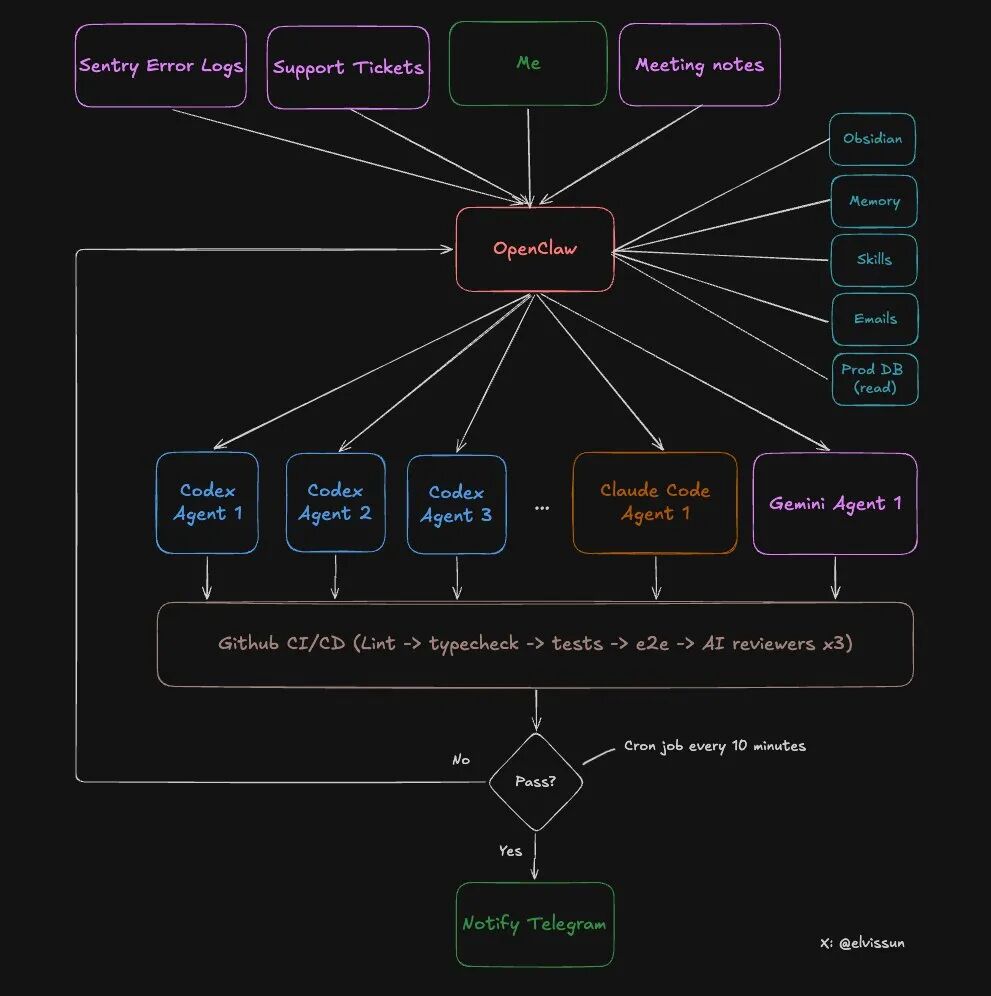
Two tiers, each with its own responsibilities:
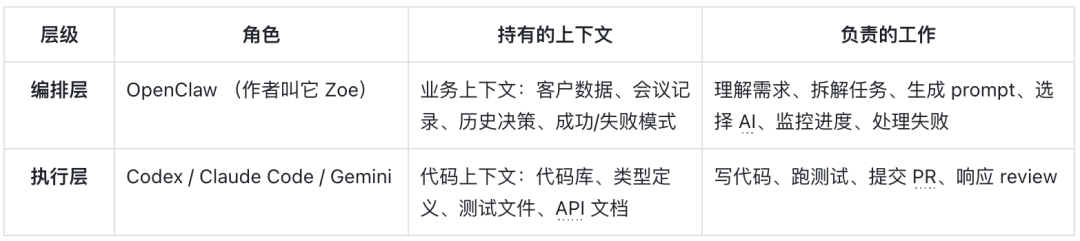
What can OpenClaw (Orchestration Layer) do?
- Read all meeting notes from Obsidian (automatically synchronized)
- Access production database (read-only access) to obtain customer configurations
- Have administrator API permissions to directly recharge customers and lift blocks
- Select appropriate agents based on task type
- Monitor the progress of all agents, analyze reasons for failures, and adjust prompts for retries
- Notify the author via Telegram upon completion
What can Agent (Execution Layer) do?
- Read and write to the codebase
- Run tests and builds
- Submit code and create PRs
- Respond to feedback from code reviews
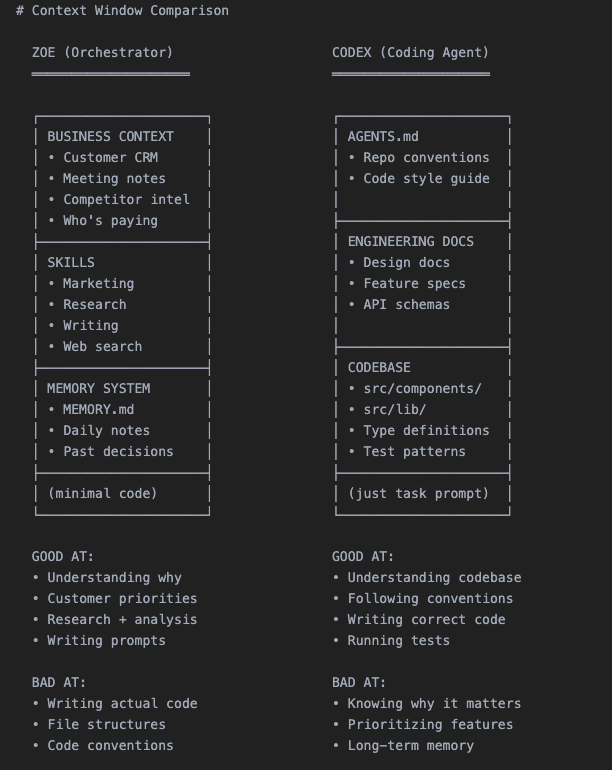
This design is clever: the security boundary is clear while ensuring efficiency.
Complete Workflow: 8 Steps from Customer Requirement to PR Merge
Now we enter the core part. Using a real case from the author last week, let’s walk through the complete process.
Background: A corporate client called, expressing a desire to reuse their configured settings and share them within the team.
Step 1: Customer Requirement → OpenClaw Understands and Breaks It Down
After the call, the author discussed this requirement with Zoe (his OpenClaw).
The magic here: zero explanation cost. Since all meeting notes are automatically synchronized to Obsidian, Zoe has already read the call content and knows who the client is, their business scenario, and existing configurations.
The author and Zoe broke down the requirement into: creating a template system that allows users to save and edit existing configurations.
Then Zoe did three things:
- Recharge the client — used the administrator API to immediately lift the client's usage restrictions
- Pull customer configuration — retrieved the client's existing settings from the production database (read-only)
- Generate prompt and start the agent — packaged all context and fed it to Codex
Step 2: Start the Agent
Zoe created for this task:
- An independent git worktree (isolated branch environment)
- A tmux session (to let the Agent run in the background)
# Create worktree + start agent git worktree add ../feat-custom-templates -b feat/custom-templates origin/main cd ../feat-custom-templates && pnpm install
tmux new-session -d -s "codex-templates" -c "/Users/elvis/Documents/GitHub/medialyst-worktrees/feat-custom-templates" "$HOME/.codex-agent/run-agent.sh templates gpt-5.3-codex high" Why use tmux? Because it allows for mid-course intervention.
If the AI goes off track, there’s no need to kill it and start over; simply send commands directly in tmux:
# Agent is going in the wrong direction tmux send-keys -t codex-templates "Stop for a moment. Do the API layer first, ignore the UI." Enter
Agent needs more context
tmux send-keys -t codex-templates "Type definitions are in src/types/template.ts, use that." Enter Meanwhile, the task will be recorded in a JSON file:{ "id": "feat-custom-templates", "tmuxSession": "codex-templates", "agent": "codex", "description": "Custom email template feature for enterprise clients", "repo": "medialyst", "worktree": "feat-custom-templates", "branch": "feat/custom-templates", "startedAt": 1740268800000, "status": "running", "notifyOnComplete": true}### Step 3: Automatic MonitoringAn automated cron job checks the status of all agents every 10 minutes.Key points: It does not "ask" the Agent how the progress is (that would consume a lot of tokens), but checks objective facts: - Is the tmux session still alive? - Has a PR been created? - What is the CI status? - If it failed, does it need to be restarted? (up to 3 retries)This monitoring script is 100% deterministic, very token-efficient, and only notifies the author when human intervention is needed.This is actually an improved version of the Ralph Loop, which will be detailed later.### Step 4: Agent Creates PRThe Agent writes the code, commits, pushes, and then creates a PR using gh pr create --fill.Note: At this point, the author will not receive a notification. Because a PR itself does not represent "completion".The definition of "completion" is: - ✅ PR has been created - ✅ Branch has been synced to main (no conflicts) - ✅ CI passed (lint, type checking, unit tests, E2E tests) - ✅ Codex reviewer approved - ✅ Claude Code reviewer approved - ✅ Gemini reviewer approved - ✅ If there are UI changes, screenshots must be includedOnly when all conditions are met is it considered truly complete.### Step 5: Automated Code ReviewEach PR will be reviewed by three Agents: - Codex Reviewer — The most reliable reviewer - Good at identifying edge cases - Can catch logical errors, missing error handling, race conditions - Very low false positive rate - Gemini Code Assist Reviewer — Free and easy to use - Can identify security issues and scalability problems missed by other reviewers - Provides specific fix suggestions - Worth using - Claude Code Reviewer — Basically useless - Overly cautious, always suggests "consider adding..." - Most suggestions are over-engineered - Unless marked as "critical", skip directlyAll three reviewers will comment directly in the PR.### Step 6: Automated TestingThe CI pipeline will run: - Lint and TypeScript checks - Unit tests - E2E tests - Playwright tests (run in a preview environment identical to production)A new rule added last week: If the PR changes the UI, a screenshot must be attached in the description; otherwise, CI will fail directly.This rule significantly shortens the review time — the author can see what has changed just by looking at the screenshot, without needing to enter the preview environment.### Step 7: Manual ReviewNow, the author receives a Telegram notification: "PR #341 is ready for review."At this point: - CI is all green - All three AI reviewers have approved - The screenshot shows the UI changes - All edge cases are recorded in the review commentsThe author's review only takes 5-10 minutes. For many PRs, he doesn't even look at the code, just looks at the screenshot and merges directly.### Step 8: MergeThe PR is merged. A daily cron job cleans up isolated worktrees and task records.The entire process, from customer requirements to code deployment, may only take 1-2 hours, while the author's actual input may only be 10 minutes.
Three Mechanisms to Make the System Smarter
Mechanism 1: Improved Ralph Loop — Not Just Repeating, But Learning
You may have heard of the Ralph Loop: Pull context from memory → Generate output → Evaluate results → Save learning.
However, most implementations have a problem: the prompt used in each loop is the same. What is learned improves future retrieval, but the prompt itself is static.
This system is different.
When the Agent fails, Zoe does not restart with the same prompt. She analyzes the failure reason with the complete business context and then rewrites the prompt:
❌ Bad Example (Static Prompt): { "Implement custom template feature" }
✅ Good Example (Dynamic Adjustment): { "Stop. The customer wants X, not Y. Here is their exact quote from the meeting: We want to preserve the existing configuration, not create a new one from scratch. Focus on configuration reuse, do not create a new process." }Zoe can make such adjustments because she has context that the execution layer Agent does not have:
- What the customer said in the meeting
- What the company does
- Why the last similar request failed
- Morning: Scans Sentry → Discovers 4 new errors → Starts 4 Agents to investigate and fix
- After the meeting: Scans meeting notes → Discovers 3 feature requests mentioned by customers → Starts 3 Codex
- Evening: Scans git log → Starts Claude Code to update changelog and customer documentation
Successful patterns will be recorded:
- "This prompt structure is very effective for the billing feature"
- "Codex needs to receive type definitions in advance"
- "Always include the test file path"
The longer the time, the better the prompts written by Zoe, because she remembers what can succeed.
Mechanism 2: Agent Selection Strategy — Different Tasks Require Different Experts
Not all Agents are equally strong. The author's summarized selection strategy:
- Codex(gpt-5.3-codex) — Main force- Backend logic, complex bugs, multi-file refactoring, tasks requiring cross-codebase reasoning
- Slow but thorough
- Accounts for 90% of tasks
- Claude Code(claude-opus-4.5) — Speed-oriented player- Frontend work
- Fewer permission issues, suitable for git operations
- (The author used to use it more often, but switched after Codex 5.3 came out)
- Gemini — Designer- Has design aesthetics
- For beautiful UIs, let Gemini generate HTML/CSS specifications first, then hand it over to Claude Code for implementation in the component system
- Gemini designs, Claude builds
Mechanism 3: Where is the Bottleneck? RAM
There is an unexpected limitation: it is not token cost, nor API rate, but memory.
Each Agent requires:
- Its own worktree
- Its own node_modules
- Running builds, type checks, tests
The author's Mac Mini (16GB RAM) can run a maximum of 4-5 Agents at the same time; any more starts swapping, and one must pray that they do not build simultaneously.So he bought a Mac Studio M4 Max (128GB RAM, $3500), which will arrive at the end of March. He said he would share whether it is worth it at that time.
You Can Also Build: From Zero to Running in Just 10 Minutes
Want to try this system?
The simplest way:
Copy this entire article to OpenClaw and tell it: "Implement an Agent cluster system for my codebase according to this architecture."
Then, it will:
- Read the architectural design
- Create scripts
- Set up the directory structure
- Configure cron monitoring
You need to prepare:
- OpenClaw account
- API access to Codex and/or Claude Code
- A git repository
- (Optional) Obsidian for storing business context
2026: A Million-Dollar Company for One Person
The author said something at the end that I found very inspiring:
"We will see a large number of million-dollar companies run by one person starting in 2026. The leverage is enormous, belonging to those who understand how to build recursively self-improving AI systems."
This is what it looks like:
- An AI orchestrator as your extension (like Zoe for the author)
- Delegating work to specialized Agents handling different business functions
- Engineering, customer support, operations, marketing
- Each Agent focuses on what it excels at
- You maintain focus and complete control
There is too much garbage content generated by AI now. Various hype, all sorts of fancy demos of "task control centers," but nothing truly useful.
The author said he wants to do the opposite: less hype, more documentation of the real building process. Real customers, real revenue, real submissions to production environments, and real failures.
This article ends here.
Core points recap:
- Dual-layer architecture: orchestration layer holds business context, execution layer focuses on code
- Complete automation: an 8-step process from requirements to PR, most tasks succeed on the first try
- Dynamic learning: not repetitive execution, but adjusting strategies based on reasons for failure
- Cost control: starting at $20/month, heavy usage at $190/month
Reference address:Content: https://x.com/elvissun/status/2025920521871716562



