Why You Must Use OpenCode
If you are currently using Claude Code and enjoying it, then you must watch this video until the end.
Because what I am about to discuss may very well determine whether you will be forced to 'lose your supply' in the coming year.
Let me state the conclusion upfront. Whether you are a beginner with Claude Code or an experienced veteran user, I strongly recommend that you must start using something as soon as possible: OpenCode. The reason is simple. You need a truly reliable backup.
In the past six months, the hottest product in the AI industry has been Claude Code launched by Anthropic. It's no longer just about writing code.
You can use it to develop complete products, automate workflows, automate desktop operations, and even use it via SDK to directly create AI agent products.
But whether you are a beginner or a seasoned Claude Code user, I strongly recommend that you must use OpenCode, the open-source alternative to Claude Code. Moreover, OpenCode performs better than Claude Code in certain aspects. If Claude Code is like an iPhone, then OpenCode is like an Android phone, offering richer compatibility, more customization options, and greater playability.
Why must you start using OpenCode?
First, Anthropic is too extreme; you need a backup for Claude Code.
Dario Amodei, the founder of Anthropic, once interned at Baidu's Silicon Valley office. It's unknown if this left him with psychological trauma. He later became an extreme anti-China figure, and Claude is currently the AI large language model with the most severe restrictions against Chinese users. Many heavy Claude users around me have had their accounts banned. Once banned, accounts cannot be reinstated through appeals; you can only reapply, but there is still a very high probability of being banned again.
Furthermore, Anthropic is extremely hostile towards competitors and likes to use unscrupulous means to deal with them, for example:
Last year, when rumors spread that Windsurf might be acquired by OpenAI, Anthropic immediately cut off Claude model access within Windsurf;
Upon learning that engineers at Musk's xAI company were using Cursor to develop xAI's models, Anthropic immediately revoked xAI's access permissions;
Upon discovering that OpenCode could use the Claude model via OAuth authorization, they cut off OpenCode's access immediately.
Claude Code users also found that during use, once OpenCode is mentioned, it stops working and no longer responds;
Anthropic was also found purchasing search keywords of competitors like OpenCode to lure users into downloading and using Claude Code;
For these reasons, many top programmers, such as DHH, the creator of Ruby on Rails, have publicly announced switching to OpenCode. For us, when using Claude Code, you never know which day your account might be banned, rendering it unusable. Many domestic developers currently use Claude Code through third-party relay stations, but this method is actually unstable. You have no idea when a relay station might also be blocked, and there are also security issues with multiple people sharing one account.
Second, Claude Code is tightly bound to the Claude model, making it difficult to stably use other AI models
Although the Claude Opus model has a good reputation in programming, if I want to use other AI models, Claude Code does not support it. For example, if I want to use a GPT model in Claude Code to help me write articles, or use a Gemini model to help me design and develop front-end pages, such needs cannot be met in Claude Code.
As a result, many developers work with multiple agent tools open simultaneously: Claude Code, OpenAI's Codex, and Google's Antigravity, all working together to use all three AI models at once. But doing this is actually very tiring, as the configuration methods for the three tools are different, and many skills and MCPs cannot be fully synchronized, making it very troublesome.
Some domestic AI models, such as Zhipu's GLM, have done adaptation work for Claude Code, and currently, it works quite smoothly. However, OpenAI and Google have not provided adaptations for Claude Code, and Anthropic would not allow it either. So, you don't know if Anthropic might one day block the use of GLM.
For us to stably use AI programming agents and to simultaneously utilize the world's top AI large models, OpenCode is worth having. So, what advantages does OpenCode have?
First, OpenCode is an open-source AI programming agent that can integrate with over 70 AI large models
Basically, any AI large model you can think of, OpenCode provides integration support. The best part is: OpenCode defaults to providing several free models for novice users, so you don't need to spend a penny or use a VPN; you can download, install, and immediately start using an AI programming agent.
And because OpenCode is open-source, everyone can modify and improve it. Therefore, OpenCode's update speed is extremely fast, with minor version upgrades almost daily. Every time you start OpenCode, the system automatically upgrades to the latest version.
In OpenCode, we can integrate OpenAI's latest GPT-5.2 model, and also use the latest Gemini 3 Pro model and Claude Opus 4.5 model via Google's Antigravity. You can completely switch between different top-tier models within the single OpenCode tool: let GPT-5.2 help you plan projects; let Claude Opus 4.5 help you write code; let Gemini 3 Pro help you design interfaces; and finally, let GPT-5.2 help you review and check code. Isn't this much better than relying solely on Claude Code?
Second, OpenCode also values Chinese developers and has Feishu topic community support
While several top AI vendors do not open their services to Chinese users, OpenCode has no barriers for Chinese users. In fact, OpenCode has a Chinese co-founder and has opened a topic community on Feishu, directly providing technical support for Chinese developers. So, we also don't have to worry about one day being banned or unable to access it.
When you download OpenCode and use the free GLM model, you can use it directly without a VPN, thus lowering the barrier to using AI programming agents to a minimum.
Third, OpenCode is highly customizable; you can design it according to your needs
OpenCode is like an Android phone. If you are already proficient, you can fully customize OpenCode to maximize its efficiency. For example, OpenCode has an open-source plugin called: oh-my-opencode. It deeply customizes OpenCode usage, integrates all conceivable best practices, and coordinates multiple agents to work in parallel simultaneously, leveraging the strengths of each AI model to let them all deliver maximum value. Claude Code is commercial closed-source software; you cannot deeply customize it yourself. Therefore, with the help of oh-my-opencode, you can use OpenCode to achieve even higher efficiency than Claude Code.
Besides programming, AI agents can help us do many other things. For example, I've seen some influencers even modify the oh-my-opencode plugin to have multiple agents work in parallel for content creation, greatly improving creative efficiency.
So, if you are already a Claude Code expert, eager to further improve efficiency through deep customization, then OpenCode is almost unmissable.
OpenCode Beginner's Guide
If you are not familiar with command-line tools and only used to graphical user interfaces, simply go to the official OpenCode website and download the installation package for your operating system:
If you are currently using Claude Code and enjoying it, then you must watch this video until the end.
Because what I'm about to say next will likely determine whether you will be forced to "lose your supply" in the coming year.
I'll state the conclusion upfront. Whether you are a beginner with Claude Code or an experienced user, I strongly recommend that you start using something as soon as possible: OpenCode. The reason is simple. You need a truly reliable backup.
Over the past six months, the hottest product in the AI industry has been Anthropic's Claude Code. It's no longer just about writing code.
You can use it to develop complete products, automate workflows, automate desktop operations, and even use it via SDK to create AI agent products.
But whether you are a beginner or an experienced Claude Code user, I strongly recommend trying the open-source alternative to Claude Code: OpenCode. Moreover, OpenCode performs better than Claude Code in certain aspects. If Claude Code is like an iPhone, then OpenCode is like an Android phone, offering greater compatibility, more customization options, and more playability.
Why must you start using OpenCode?
First, Anthropic is too extreme; you need a backup for Claude Code.
Dario Amodei, the founder of Anthropic, once interned at Baidu's Silicon Valley office. It's unclear if this left him with psychological trauma, but he later became an extreme anti-China figure. Claude is currently the AI model with the strictest bans on Chinese users. Many heavy Claude users around me have had their accounts banned. Once banned, there is no way to appeal; you can only reapply, but there is still a high probability of being banned again.
Additionally, Anthropic is extremely hostile toward competitors and uses unethical tactics against them, such as:
Last year, when rumors spread that Windsurf might be acquired by OpenAI, Anthropic immediately cut off Claude model access for Windsurf;
Upon learning that engineers at Musk's xAI company were using Cursor to develop xAI's models, Anthropic immediately revoked xAI's access;
Upon discovering that OpenCode could use the Claude model via OAuth authorization, Anthropic immediately cut off OpenCode's access.
Claude Code users also found that mentioning OpenCode during use would cause it to stop working and become unresponsive;
Anthropic was also found purchasing search keywords for competitors like OpenCode to lure users into downloading and using Claude Code;
Because of this, many top programmers, such as DHH, the creator of Ruby on Rails, have publicly announced switching to OpenCode. For us, when using Claude Code, you never know when your account might be banned, rendering it unusable. Many developers in China now use Claude Code through third-party gateways, but this method is unstable. You never know when the gateway might also be blocked, and there are security issues with multiple people sharing one account.
Second, Claude Code is tightly bound to the Claude model, making it difficult to use other AI models stably.
Although the Claude Opus model has a good reputation for programming, if I want to use other AI models, Claude Code does not support it. For example, if I want to use the GPT model in Claude Code to help me write articles, or use the Gemini model to design and develop front-end pages, such needs cannot be met in Claude Code.
As a result, many developers open multiple agent tools simultaneously to work: Claude Code, OpenAI's Codex, and Google's Antigravity, just to use all three AI models at once. But this is exhausting, as the configuration methods for the three tools differ, and many skills and MCPs cannot be fully synchronized, making it very cumbersome.
Some domestic AI models, such as Zhipu's GLM, have adapted to Claude Code, and the experience is indeed smooth. However, OpenAI and Google have not provided adaptations for Claude Code, and Anthropic would not allow it. So, you never know when Anthropic might block the use of GLM.
To ensure stable use of AI programming agents and to simultaneously leverage the world's top AI models, OpenCode is worth having. So, what advantages does OpenCode offer?
First, OpenCode is an open-source AI programming agent that can integrate over 70 AI models.
Basically, any AI model you can think of, OpenCode provides integration support. The best part is that OpenCode offers several free models for beginners, so you don't need to spend a penny or use a VPN. Just download and install it to start using an AI programming agent immediately.
Moreover, since OpenCode is open-source, everyone can modify and improve it. As a result, OpenCode is evolving rapidly, with minor version updates almost daily. Every time you start OpenCode, the system automatically upgrades to the latest version.
In OpenCode, we can integrate OpenAI's latest GPT-5.2 model, use Google's Antigravity to access the latest Gemini 3 Pro model and Claude Opus 4.5 model. You can seamlessly switch between different top-tier models within a single OpenCode tool: let GPT-5.2 help you plan projects; let Claude Opus 4.5 write code; let Gemini 3 Pro design interfaces; and finally, let GPT-5.2 review and check the code. Isn't this much better than relying solely on Claude Code?
Second, OpenCode also values Chinese developers and has a Feishu community for support.
While several top AI vendors do not open their services to Chinese users, OpenCode has no barriers for Chinese users. In fact, OpenCode has a Chinese co-founder and has established a Feishu community to provide technical support directly to Chinese developers. So, we don't have to worry about being banned or losing access one day.
When you download OpenCode and use the free GLM model, you don't need a VPN to use it directly, lowering the barrier to entry for AI programming agents.
Third, OpenCode is highly customizable, allowing you to design it according to your needs.
OpenCode is like an Android phone. If you are proficient, you can fully customize OpenCode to maximize efficiency. For example, OpenCode has an open-source plugin called oh-my-opencode, which deeply customizes OpenCode usage, integrates all conceivable best practices, and coordinates multiple agents to work in parallel, leveraging the strengths of each AI model to maximize their value. Claude Code, on the other hand, is a closed-source commercial software, so you cannot deeply customize it yourself. With the help of oh-my-opencode, you can achieve even higher efficiency with OpenCode than with Claude Code.
AI agents can do more than just programming; they can help us with many other tasks. For example, I've seen some influencers modify the oh-my-opencode plugin to enable multiple agents to work in parallel for content creation, greatly improving efficiency.
So, if you are already a Claude Code expert and eager to further improve efficiency through deep customization, OpenCode is almost impossible to miss.
Getting Started with OpenCode for Beginners
If you are unfamiliar with command-line tools and prefer using a graphical user interface, simply visit the official OpenCode website and download the installation package for your operating system:
As a result, many developers simultaneously open multiple AI agent tools to work: using Claude Code, OpenAI's Codex, and Google's Antigravity together to leverage all three AI models at once. However, this approach is actually quite tiring, as the configuration methods for the three tools are different, and many skills and MCPs cannot be fully synchronized, making it very troublesome.
Some domestic AI models, such as Zhipu's GLM, have been adapted for Claude Code, and currently, the experience is indeed quite smooth. However, OpenAI and Google do not provide adaptations for Claude Code, and Anthropic would not allow such actions either. So, you never know when Anthropic might block the use of GLM.
For us to stably use AI programming agents and simultaneously leverage the world's top-tier AI large models, OpenCode is worth having. So, what advantages does OpenCode have?
First, OpenCode is an open-source AI programming agent that can integrate with over 70 AI large models
Basically, any AI large model you can think of, OpenCode provides integration support. The best part is: OpenCode defaults to offering several free models for novice users, so you don't need to spend a penny or set up a VPN. Just download and install it to start using the AI programming agent immediately.
Moreover, since OpenCode is open-source, everyone can modify and improve it. Therefore, OpenCode is currently upgrading at a rapid pace, with minor version updates almost daily. Every time you start OpenCode, the system automatically upgrades to the latest version.
In OpenCode, we can integrate OpenAI's latest GPT-5.2 model, and also use the latest Gemini 3 Pro model and Claude Opus 4.5 model through Google's Antigravity. You can completely switch between different top-tier models within a single OpenCode tool: let GPT-5.2 help you plan projects; let Claude Opus 4.5 write code for you; let Gemini 3 Pro design interfaces; and finally, let GPT-5.2 review and check the code. Isn't this much better than relying solely on Claude Code?
Second, OpenCode also values Chinese developers and has Feishu topic community support
While several top AI vendors do not open their services to Chinese users, OpenCode has no barriers for Chinese users. In fact, OpenCode has a Chinese founder and has opened a topic community on Feishu, directly providing technical support for Chinese developers. So, we don't have to worry about being banned or unable to access it one day.
When you download OpenCode and use the free GLM model, you can use it directly without setting up a VPN, lowering the barrier to using AI programming agents to the minimum.
Third, OpenCode is highly customizable, allowing you to design it according to your needs
OpenCode is like an Android phone; if you are already proficient, you can fully customize OpenCode to maximize efficiency. For example, OpenCode has an open-source plugin called oh-my-opencode, which deeply customizes OpenCode usage, integrates all conceivable best practices, and coordinates multiple agents to work in parallel, leveraging the strengths of each AI model to maximize their value simultaneously. Claude Code, on the other hand, is commercial closed-source software, so you cannot deeply customize it yourself. Therefore, with the help of oh-my-opencode, you can achieve higher efficiency with OpenCode than with Claude Code.
Besides programming, AI agents can help us with many other tasks. For example, I've seen some influencers even modify the oh-my-opencode plugin to have multiple agents work in parallel for content creation, greatly improving creative efficiency.
So, if you are already a Claude Code expert and eager to further improve efficiency through deep customization, OpenCode is almost unmissable.
OpenCode Beginner's Guide
If you are not familiar with command-line tools and only used to graphical user interfaces, simply go to the OpenCode official website and download the installation package for your operating system:
https://opencode.ai/
After installing OpenCode, open the app:
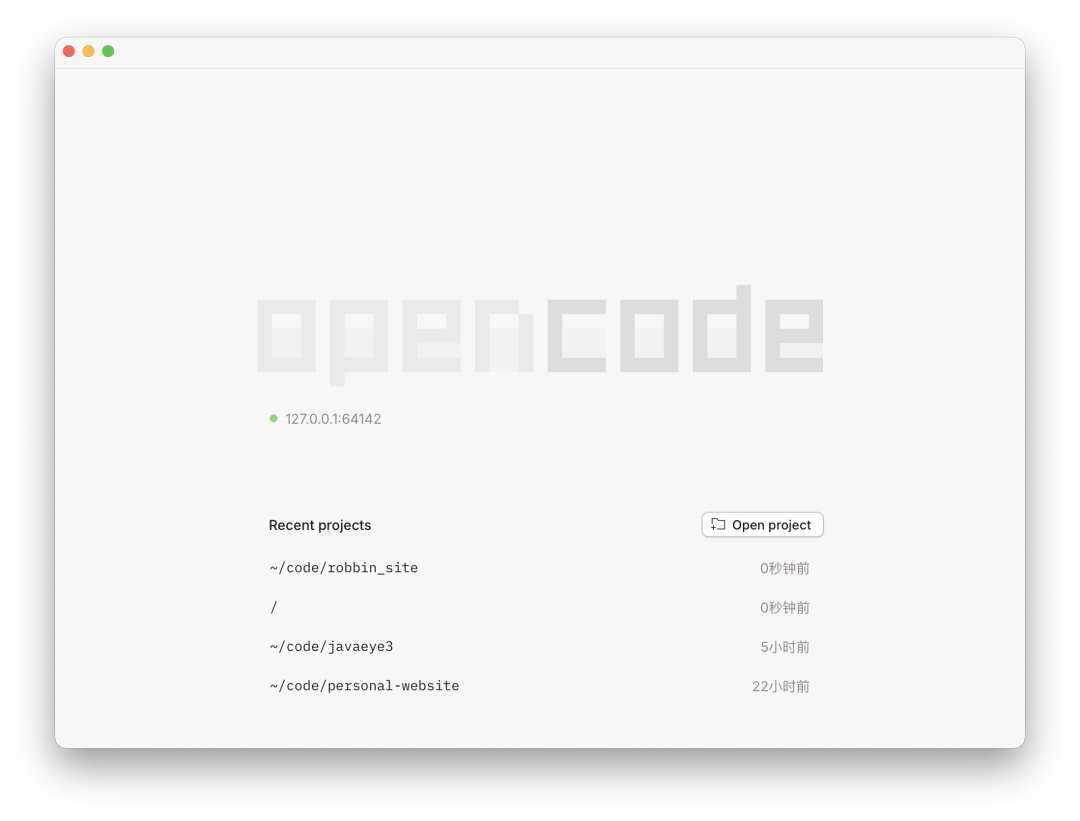
It's a very clean and simple interface. Click "Open Project," select a directory you want it to read and operate on, and you're ready to start.
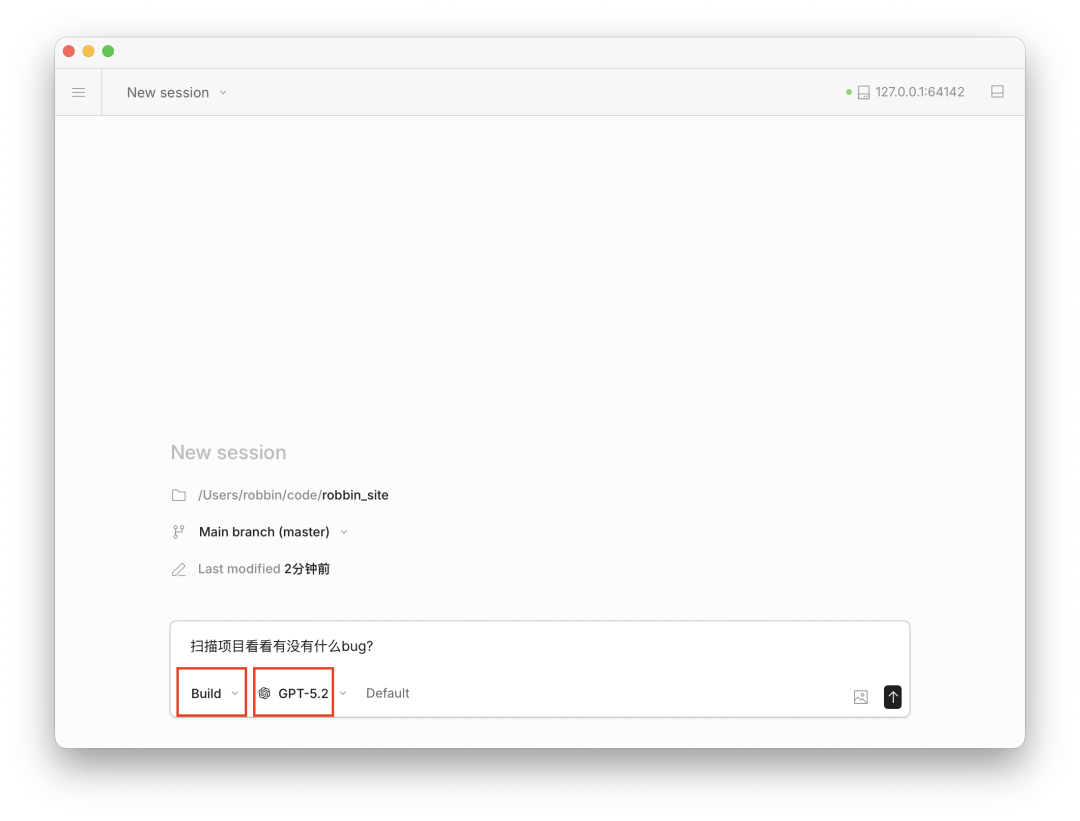
For example, I selected a project I wrote earlier, and then I can give commands to OpenCode in the dialog box. Please note:
The first box in the lower left corner: Build, which means after giving a command, OpenCode will execute it; we can open the dropdown list and change it to: Plan. Plan mode is the meeting mode, where it only talks and doesn't act; Build mode is the working mode, where it acts immediately after being told.
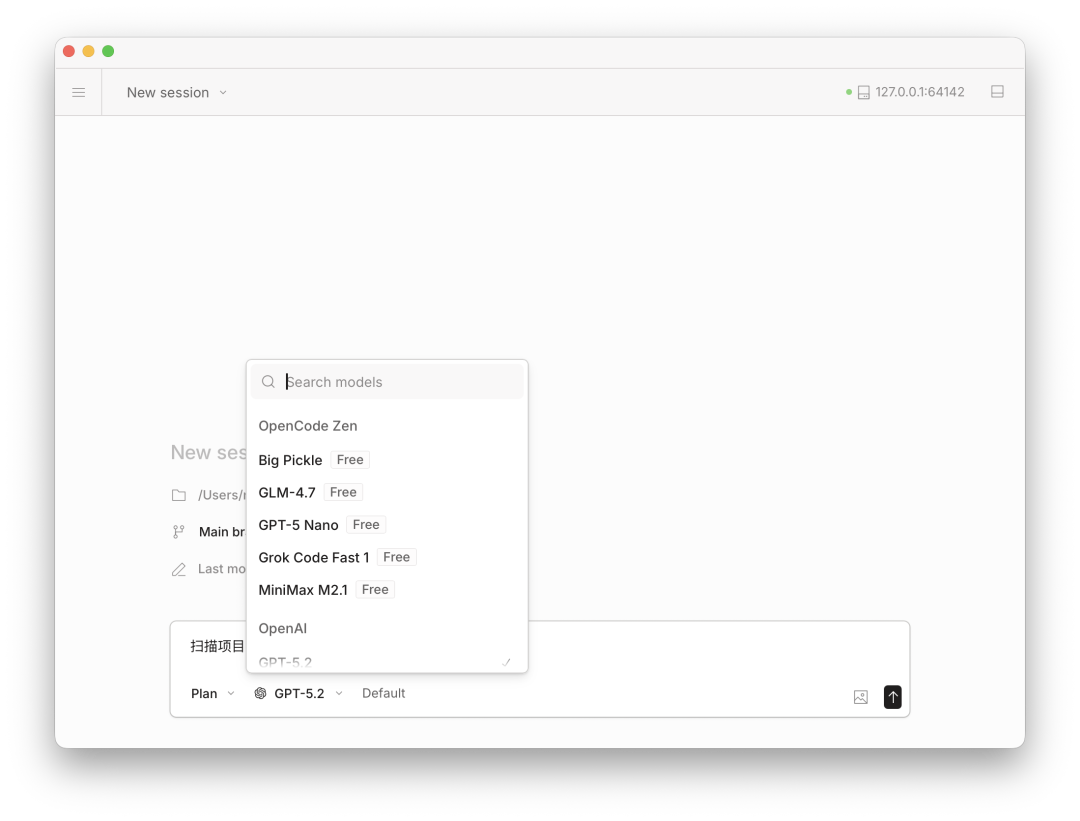
Then choose which AI model to use. By default, OpenAI has provided several Free, i.e., free models. You can choose your favorite, such as GLM-4.7 or MinMax M2.1, so you can work without setting up a VPN:
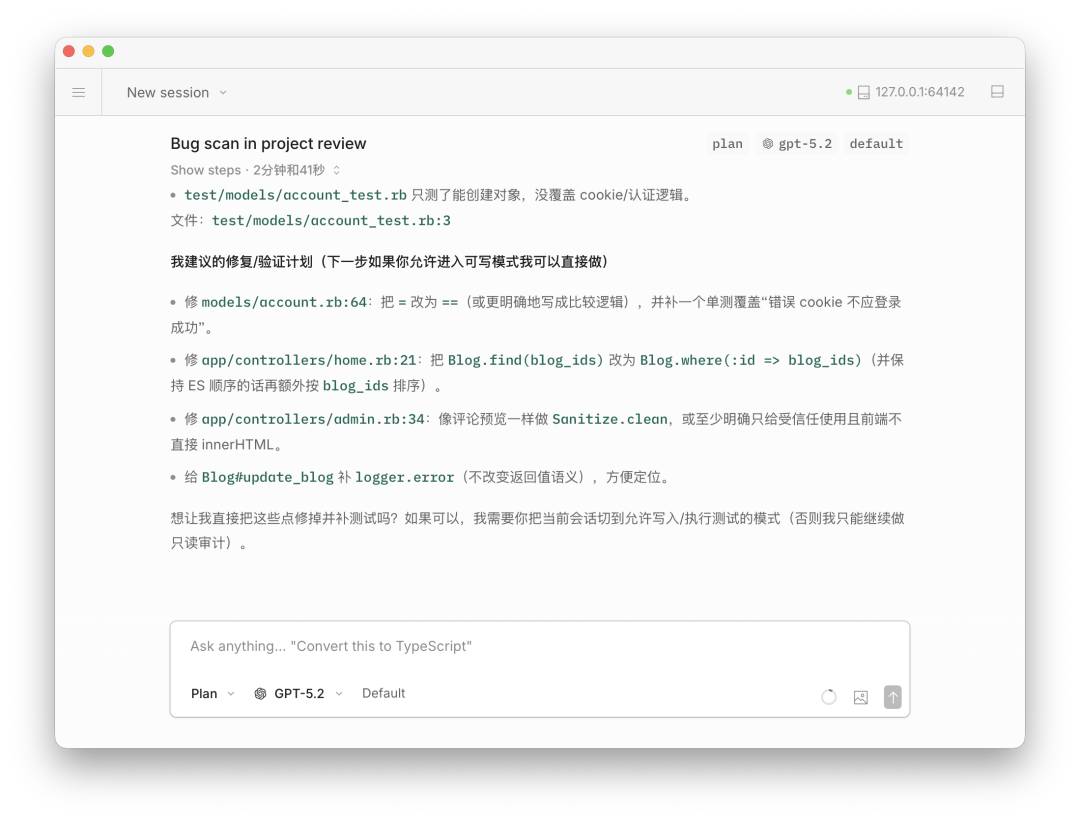
At this point, you can happily command OpenCode to work for you. For example, I asked OpenCode to check if the project has any bugs:
If you want to advance a bit further, I recommend using OpenCode's Terminal User Interface, or TUI. It's more convenient, faster, and more powerful. According to OpenCode's Terminal User Interface, we need to open a terminal program (Terminal.app on Mac, PowerShell on Windows) and enter the installation command:
curl -fsSL https://opencode.ai/install | bashAfter installation, enter the `opencode` command in your terminal to enter OpenCode:
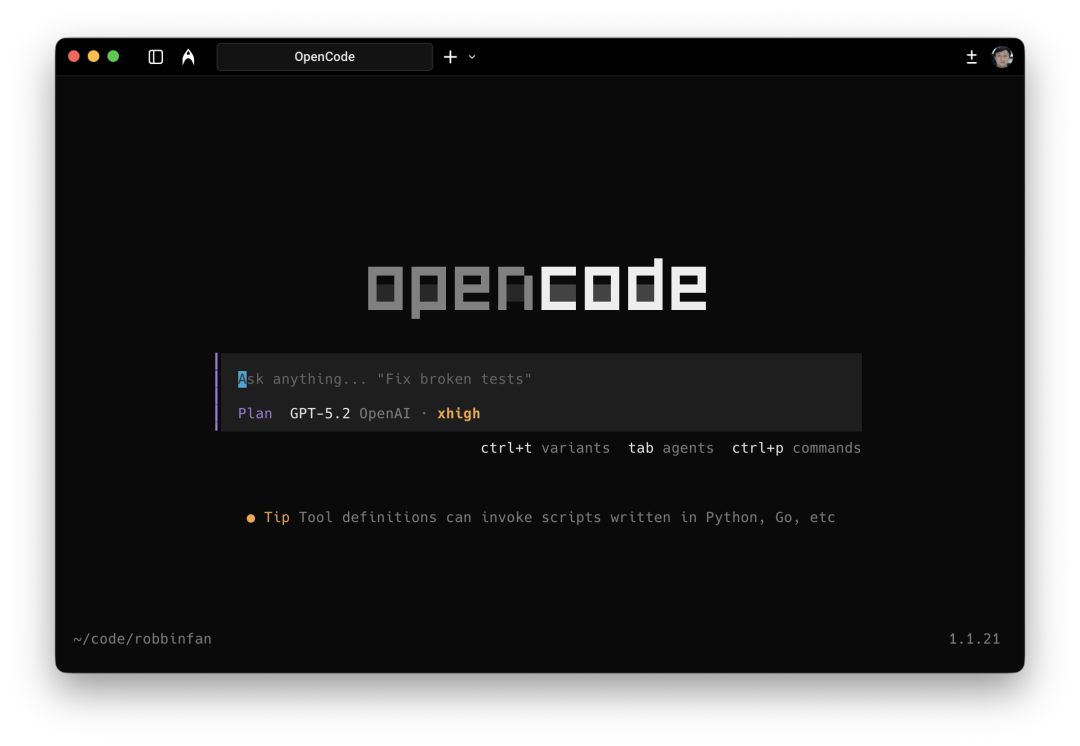 The usage is the same, but the shortcuts are different:
Tab key to switch between Plan mode / Build mode;
Ctrl + P to open the command window and select different commands to execute;
Ctrl + T to switch the AI model's thinking intensity: low, medium, high, xhigh;
Knowing these is enough to work on projects. Just remember to start in Plan mode, have a thorough discussion with OpenCode, and then switch to Build mode to start working. As for many other features, you can directly ask OpenCode during use, and it will guide you step by step.
How to Use the Three Major Models in OpenCode: GPT, Gemini, and Claude
If you want to use the GPT-5.2 Codex model in OpenCode, you first need to be a ChatGPT Plus member, which costs $20 per month. Open OpenCode, use the Ctrl+P shortcut to open the command list, then select: Switch Models, and choose provider:
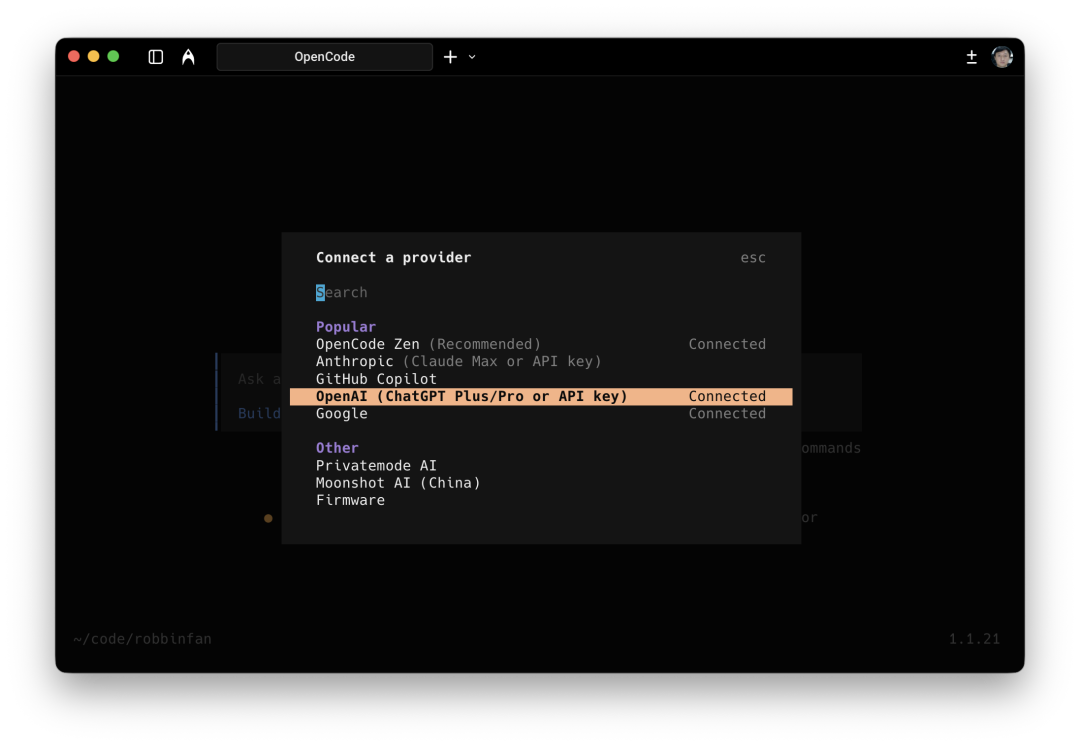 Then move the cursor to the OpenAI line, select it, and choose the first line under Auth Method: ChatGPT Pro/Plus. It will then redirect to the browser for ChatGPT account authentication. After confirmation, close the browser, return to the terminal, and you will see the four models under OpenAI:
As a result, many developers simultaneously open multiple AI agent tools to work: using Claude Code, OpenAI's Codex, and Google's Antigravity together to leverage all three AI models at once. However, this approach is actually quite tiring, as the configuration methods for the three tools are different, and many skills and MCPs cannot be fully synchronized, making it very troublesome.
Some domestic AI models, such as Zhipu's GLM, have been adapted for Claude Code, and currently, the experience is quite smooth. However, OpenAI and Google have not provided adaptations for Claude Code, and Anthropic would not allow such actions either. So, you never know when Anthropic might block the use of GLM.
For us to stably use AI programming agents and simultaneously utilize the world's top-tier AI large models, OpenCode is worth having. So, what advantages does OpenCode have?
First, OpenCode is an open-source AI programming agent that can integrate over 70 AI large models
Basically, any AI large model you can think of, OpenCode provides integration support. The best part is: OpenCode offers several free models for novice users by default, so you don't need to spend a penny or set up a VPN; just download and install it to start using the AI programming agent immediately.
Moreover, since OpenCode is open-source, everyone can modify and improve it. Therefore, OpenCode is currently upgrading at a rapid pace, with minor version updates almost daily. Every time you start OpenCode, the system automatically upgrades to the latest version.
In OpenCode, we can integrate OpenAI's latest GPT-5.2 model, and also use the latest Gemini 3 Pro model and Claude Opus 4.5 model through Google's Antigravity. You can completely switch between different top-tier models within a single OpenCode tool: let GPT-5.2 help you plan projects; let Claude Opus 4.5 write code for you; let Gemini 3 Pro design interfaces; and finally, let GPT-5.2 review and check the code. Isn't this much better than relying solely on Claude Code?
Second, OpenCode also values Chinese developers and has Feishu topic community support
While several top AI vendors do not open their services to Chinese users, OpenCode has no barriers for Chinese users. In fact, OpenCode has a Chinese co-founder and has opened a topic community on Feishu, directly providing technical support for Chinese developers. So, we don't have to worry about being banned or losing access one day.
When you download OpenCode and use the free GLM model, you can use it directly without setting up a VPN, thus lowering the barrier to using AI programming agents to the minimum.
Third, OpenCode is highly customizable; you can design it according to your needs
OpenCode is like an Android phone; if you are already proficient, you can fully customize OpenCode to maximize its efficiency. For example, OpenCode has an open-source plugin called oh-my-opencode, which deeply customizes OpenCode usage, integrates all conceivable best practices, and coordinates multiple agents to work in parallel, leveraging the strengths of each AI model to maximize their value simultaneously. In contrast, Claude Code is commercial closed-source software, so you cannot deeply customize it yourself. Therefore, with the help of oh-my-opencode, you can achieve higher efficiency with OpenCode than with Claude Code.
Besides programming, AI agents can help us with many other tasks. For instance, I've seen some influencers even modify the oh-my-opencode plugin to have multiple agents work in parallel for content creation, greatly improving creative efficiency.
So, if you are already a Claude Code expert and eager to further improve efficiency through deep customization, OpenCode is almost unmissable.
OpenCode Beginner's Guide
If you are not familiar with command-line tools and prefer using a graphical user interface, simply go to the OpenCode official website and download the installation package for your operating system:
https://opencode.ai/
After installing OpenCode, open the app:
It's a very clean and simple interface. Click "Open Project," select a directory you want it to read and operate on, and you're ready to start.
For example, I selected a project I wrote earlier, and then I can give commands to OpenCode in the dialog box. Please note:
The first box in the lower left corner: Build. This means that after giving a command, OpenCode will execute it. We can open the dropdown list and change it to: Plan. Plan mode is the meeting mode—all talk, no action; Build mode is the working mode—actions follow words.
Then choose which AI model to use. By default, OpenAI has provided several Free, i.e., free models. You can choose your favorite, such as GLM-4.7 or MinMax M2.1, so you can work without setting up a VPN:
At this point, you can happily command OpenCode to work for you. For example, I asked OpenCode to check if the project has any bugs:
If you want to advance a bit further, I recommend using OpenCode's Terminal User Interface (TUI). It's more convenient, faster, and more powerful. To use OpenCode's TUI, we need to open a terminal program (Terminal.app on Mac, PowerShell on Windows) and enter the installation command:
curl -fsSL https://opencode.ai/install | bashAfter installation, enter the `opencode` command in your terminal to launch OpenCode:
The usage is the same, but the shortcuts differ:
Tab key to switch between Plan mode / Build mode;
Ctrl + P to open the command window and select different commands to execute;
Ctrl + T to switch the AI model's thinking intensity: low, medium, high, xhigh;
Knowing these is enough to work on projects. Just remember to start in Plan mode, have a thorough discussion with OpenCode, and then switch to Build mode to start working. As for many other features, you can simply ask OpenCode during use, and it will guide you step by step.
How to Use the Three Major Models in OpenCode: GPT, Gemini, and Claude
If you want to use the GPT-5.2 Codex model in OpenCode, you first need to be a ChatGPT Plus member, which costs $20 per month. Open OpenCode, use the Ctrl+P shortcut to open the command list, then select: Switch Models, and choose provider:
Then move the cursor to the OpenAI line, select it, and choose the first line under Auth Method: ChatGPT Pro/Plus. This will redirect you to a browser to authenticate your ChatGPT account. After confirmation, close the browser and return to the terminal. You will then see four models under OpenAI:
GPT-5.1
GPT-5.1 Codex
GPT-5.2
GPT-5.2 Codex
I chose to add GPT-5.2 and GPT-5.2 Codex to the Favorite list for easy switching. This completes the GPT model configuration.
If you want to install and use Gemini 3 Pro and Claude Opus models, open OpenCode and directly enter the following command:
Install the opencode-antigravity-auth plugin and add the Antigravity model definitions to ~/.config/opencode/opencode.json by following: https://raw.githubusercontent.com/NoeFabris/opencode-antigravity-auth/dev/README.mdOpenCode will then install a plugin called `` and guide you to open a browser to log into your Google account.
After logging into your Google account and authorizing, you can use it. If you have multiple Google accounts, you can log into all of them, combining the usage quotas of several accounts. However, I personally don't recommend doing this. I myself just pay $20 per month to subscribe to Gemini Pro. Because Gemini's membership offers very generous AI model call quotas, it's quite cost-effective.
After logging in and authorizing, we can see a long list of models. We can select Gemini 3 Pro, Claude Sonnet 4.5, and Claude Opus 4.5 models to add to the Favorite list, allowing us to switch models anytime via shortcuts:
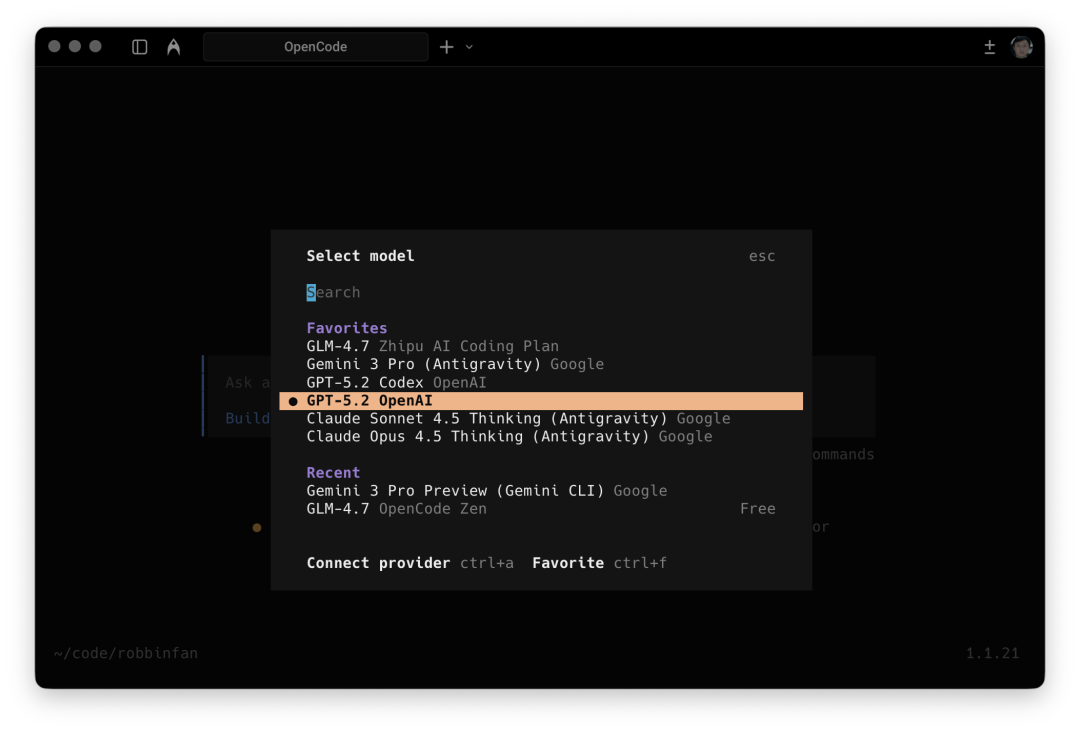
For example, in my Favorites, I have saved the two GPT-5.2 models, the two Claude 4.5 models, and Gemini 3 Pro, thus gathering the three top-tier AI models. I generally use GPT models for writing and planning, switch to Claude models for coding, use Gemini 3 for interface design, and finally use GPT models for code review.
Finally, if you want to squeeze every bit out of the three major models, you can install the oh-my-opencode plugin. It will simultaneously use all the models I mentioned above, run different models with different agents, and even make the models work repeatedly,堪称 the AI era's Zhou Bapi, not stopping until the AI models are fully exhausted.
Installation is also very simple. Just paste the following line into the OpenCode dialog box, and OpenCode will work diligently to complete all tasks for you.
Install and configure by following the instructions here https://raw.githubusercontent.com/code-yeongyu/oh-my-opencode/refs/heads/master/README.mdI personally haven't installed or used oh-my-opencode yet because I am also a novice with Claude Code and OpenCode and don't want my OpenCode environment to be overly customized for programming. Since oh-my-opencode is a highly optimized environment for programming, and I currently don't have many programming tasks, I use AI more for personal content creation and other workflows.
Finally, I actually use both Claude Code and OpenCode simultaneously. The feeling of using both is:
Claude Code + Claude Opus is more like an iPhone—closed, not many tricks;
OpenCode + the three top-tier models is more like an Android phone—open, full of possibilities.
And I personally prefer using OpenCode a bit more. If Anthropic continues to be this closed, I believe there is a high possibility that Claude Code will be surpassed by OpenCode in the future.



